 Add to Chrome
Appointments
Booking pages release cancellations at no particular hour and look identical until one appears. It is the same job as this page describes — set the words a free slot puts on the page and monitor appointment availability.
A free ticket drop alert extension for Chrome. Point it at the page selling the tickets you are waiting for, set the words that will appear when they go up, and it watches the page so you do not have to.
Add to Chrome — It’s FreeNo ads. No signup. No fees.
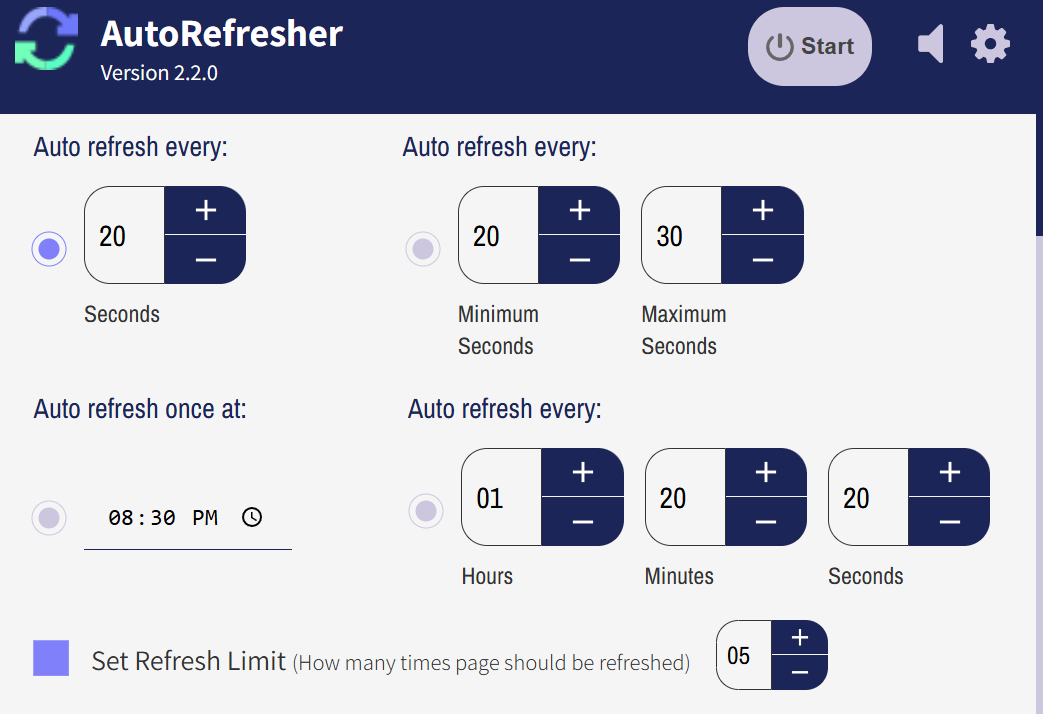
Two halves of the extension do the work here. The auto refresh feature reloads the event page on the gap you set, and the page monitor feature reads each reload and compares it against the one before. Refreshing on its own only tells you the page loaded again. The monitor is the half that notices the page now says something it did not say ten minutes ago.
What it is not is a way in. AutoRefresher does not click anything on the page it is watching, does not fill in a form, does not hold a seat, and does not move through a queue on your behalf. It does not put you ahead of anybody else watching the same page either. What it removes is the part where you have to be the one watching — which, for something that goes on sale at ten on a Friday morning, is most of the problem.
One thing worth knowing before you start. Sites selling high-demand tickets take a dim view of traffic that looks automated, and a very short interval on a busy page is the quickest way to look that way. If a challenge page turns up, or the page starts taking noticeably longer to come back, lengthen the interval. That is the site’s rule rather than a limit in the extension, and it is better to read it here than to find it out on the morning it matters.
Set this up on the event page at any point before the tickets go up. There is no account to make and nothing to install beyond the extension itself, and nothing to come back and start on the day.
The page for the show you are waiting on, on whichever site is selling it. Leave that tab open. It can be watched long before anything is on sale, and the tab is where the whole thing runs.
Whatever the page will say once tickets exist: Tickets Available, Buy Now, the name of a section that is greyed out today. The monitor compares each reload against those words and stays quiet until they turn up.
AutoRefresher reloads the page on the gap you choose, and a browser notification fires when your words appear. It arrives with that tab in the background and with Chrome behind another window.
Then leave it. The tab does the checking, and the alert is what tells you the waiting is over.
There is no list of supported sites. AutoRefresher reloads the address you give it and reads what comes back, so a Live Nation event page, an AXS listing, a StubHub resale page and a venue’s own box office are all the same job to it. Anywhere with an address works as an event ticket monitor.
The date that matters is rarely the announced one. Presales open early, holds get released late, and extra nights get added after the first one sells out — all on the same page, and the page says nothing about any of it beforehand.
Season seats and playoff runs come back at no particular hour, and a page that said nothing was available yesterday says something different today without telling you. Watching for the words beats opening the tab between other things.
Festivals sell in phases and payment plans lapse, so tickets return weeks after the sold-out announcement. There is no schedule to check against, which is exactly the case for watching a page rather than remembering to look at it.
A short run has no second chance, and returns go back on sale the same day somebody gives them up — often in the morning, often for that evening. The box office page is the one that changes, and nothing about it emails you when it does.
Tools in this category sell an edge — a faster path, a better position, something the rest of the page does not get. AutoRefresher does not sell one, and it is worth being plain about why rather than quiet about it. The queue runs on the seller’s side of the connection. An extension runs on yours, looking at the same page everybody else can see, and no amount of paying for it moves it across that line.
What is left, once you stop paying for an edge, is a check that happens whether or not you are at the desk. That part costs nothing here. There is no tier above the one you install: no ads, no account, no trial that runs out, and no shorter interval sitting behind a payment form. It costs nothing because there is nothing on the other end to pay for — the reloading and the comparing both happen in your own browser.
Onsale times are published in advance. That is the week to set this up — not the moment you are already sitting in a queue and would rather not touch anything.
Add to Chrome — It’s FreeBooking pages release cancellations at no particular hour and look identical until one appears. It is the same job as this page describes — set the words a free slot puts on the page and monitor appointment availability.
A filtered search on a job board keeps its own address, so the search itself can be watched instead of re-run every morning. Point AutoRefresher at that address and monitor job postings.
Open the event page and leave that tab open. Start a process on it, type the words that will be there once tickets are, and choose how often it reloads. There is no account step and nothing to configure anywhere else. You can do all of this days before the onsale — the tab does not need to be in front of you and the page does not need to have changed yet.
It can, and it is worth setting up with that in mind. Sites selling high-demand tickets watch for traffic that does not look like a person, and a very short interval on a busy page is the quickest way to look that way. If you start seeing a challenge page, or the page begins taking noticeably longer to come back, lengthen the interval. That is the site’s rule rather than a limit in the extension — AutoRefresher will run at whatever gap you give it.
No, and it does not try to. AutoRefresher watches the page and tells you when it changes; every click after that is yours. It does not fill in a form, hold a seat, or move through a queue on your behalf. What it removes is the part where you have to keep the page open in front of you in case the change happens while you are looking somewhere else.
Before, every time. The point of it is that the checking happens while you are doing something else, which is only useful if it is already running when the page changes. If you are already in a queue, you are better off leaving that tab exactly as it is and setting this up for the next one.