
 Add to Chrome
Tickets
Returns and extra releases go up without an announcement, and the page says nothing until they do. Same setup as this one — point it at the event page and track ticket drops.
A free appointment availability monitor for Chrome. Point it at the booking page you have been refreshing by hand, set the words you are waiting for, and it tells you when they appear.
Add to Chrome — It’s FreeNo ads. No signup. No fees.
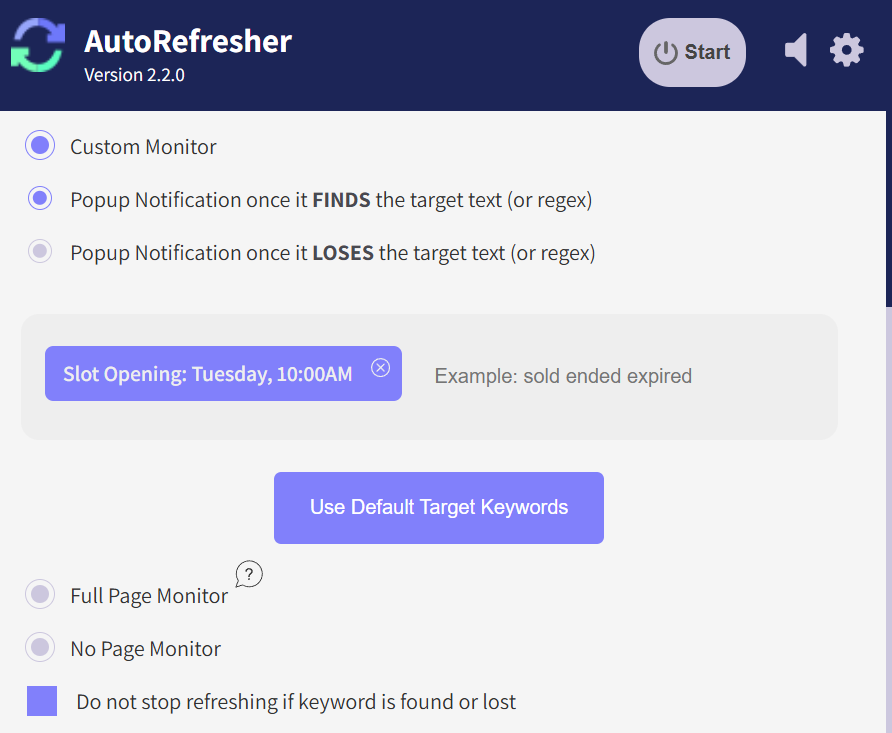
There is no account to make and nothing to install beyond the extension itself. Every step below happens on the booking page you already have open.
Go to the page you have been checking — the one that keeps telling you there is nothing available. Leave that tab open. That page is what gets watched, not the site’s front door.
Whatever the page will say when a slot opens: available, book now, a month it does not currently offer. Every reload is read and compared against your words, so a page that has not changed stays quiet.
AutoRefresher will auto refresh appointment pages on the gap you choose, and a browser notification fires when your words turn up. It arrives whether or not that tab is in front.
Two halves of the extension do the work. The auto refresh feature reloads the booking page on the gap you set, and the page monitor feature reads each reload and compares it with the one before. Refreshing on its own only tells you the page loaded again; the monitor is the half that tells you something on it has changed.
What it does not do is book anything. AutoRefresher watches the page and alerts you; it does not fill in a form, hold a slot, or move through a queue on your behalf. When the notification arrives, the booking is still yours to make.
AutoRefresher has no list of supported sites. It reloads whatever page you point it at and reads what comes back, so a consulate calendar, a passport office queue, a licensing appointment page and a clinic’s own booking form are all the same job to it.
Consulate calendars change without warning, and the page gives no sign beforehand. Set the words that appear when a date frees up, and the reload that finds them is the one that tells you.
The page looks identical every time you open it, right up until the moment a slot exists. That is the change worth watching for, and the one that is easiest to miss by hand.
Cancellations put slots back at no particular hour, which is why checking on a schedule of your own never quite lines up with one. A tab watching for the words on an open date does not have to line up with anything.
Specialist lists move when somebody else cancels. Point AutoRefresher at the practice’s own booking page and it works as a doctor appointment slot finder, with no account to make and no waiting list to join.
Monitoring tools tend to be free until the moment they are useful. The check that runs often enough to catch a cancellation is the paid one, which means the price arrives exactly as your deadline gets closer — and a service knows perfectly well that somebody with a travel date coming up will pay it.
There is no paid tier here, so there is nothing to hold back and no point at which it starts asking. There is no account either. You have already handed a government portal your documents; you should not have to hand an extension an email address on top of it. The checks run in your browser, on a page you already had open — nothing syncs anywhere and nothing asks for an address.
The page will change at some point. The only question is whether anything is watching when it does.
Add to Chrome — It’s FreeReturns and extra releases go up without an announcement, and the page says nothing until they do. Same setup as this one — point it at the event page and track ticket drops.
A filtered search on a job board has its own address, which means it can be watched instead of re-run. Point AutoRefresher at it and track new job listings as they are posted.
Open the page you have been checking and leave that tab open. Start a process on it, type the words that will appear when a slot is free, and choose how often it reloads. There is no account step and nothing to configure anywhere else. If a portal starts slowing you down, lengthen the interval — that is the site’s rule rather than a limit in the extension.
Yes. It is a free appointment monitor extension with no tier above the one you install: no ads, no account, no trial that expires, and no setting held back for a subscription. It costs nothing because there is nothing on the other end to pay for — the checking happens in your own browser.
No. AutoRefresher watches the page and tells you when it changes; the booking itself is yours to complete. What it removes is the part where you reload for hours in case the change happens while you are looking somewhere else.
That is the case it is built for. The alert is a browser notification rather than something inside the page, so it arrives with that tab in the background and with Chrome behind another window. You do not have to keep the booking page in front of you for it to work.