
 Add to Chrome
The full-time search
You are watching a handful of boards for a role that may be posted at any hour of any day. Monitor job postings automatically and the search runs for weeks without you opening a tab to check it.
A free job listing alert extension for Chrome. Point AutoRefresher at a filtered search on LinkedIn, Indeed, Upwork or Fiverr, and it tells you when something new shows up.
Add to Chrome — It’s FreeNo ads. No signup. No subscription.
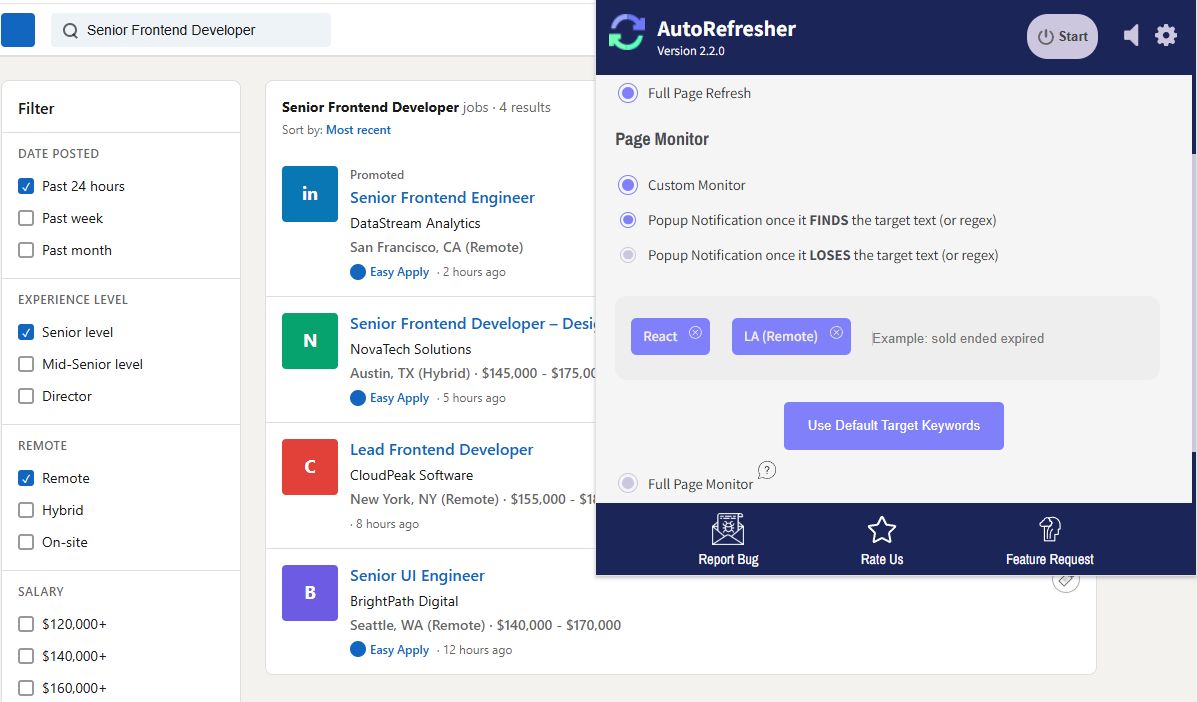
AutoRefresher does not know what a job board is, which is why it works on all of them. It reloads a page you choose and reads what comes back. If your search has a link, it can be watched — including Glassdoor, Freelancer and a company’s own careers page.
Filter by title, location and date posted, then watch the results page. LinkedIn reorders constantly, so watching for a specific job title beats watching for “anything new”.
Indeed’s newest-first sort is only useful if you are looking at it. Set an interval on the filtered URL and the reload happens whether or not the tab is in front.
On Upwork the first few proposals get read and the rest queue behind them. Watching a filtered feed for your rate and your skill closes the gap between a job being posted and you seeing it.
Fiverr’s buyer requests move fast and expire. Watch the brief list for the words that describe your service rather than checking it between other work.
Run the search you would actually run — the filters, the location, the pay range. The address bar now holds that exact search. That address is what AutoRefresher watches.
Filter the board down to the jobs you would actually apply for, then leave that page open. The filtered search has its own address, and that is the page being watched — not the board’s front page.
Type the words that would appear on a posting you want: a job title, a skill, a rate. Every reload gets checked against them, so a page full of jobs you have already seen stays quiet.
When the words turn up, a browser notification fires. It arrives whether or not that tab is in front and whether or not Chrome is the window you are using.
Set it once and it keeps going. Nothing to check back on, and nothing waiting in an inbox.
Two halves of the extension do the work here. The auto refresh feature reloads your filtered search on whatever interval you set, and the page monitor feature reads what comes back and compares it to last time. Auto refresh alone will tell you the page reloaded; the monitor is what tells you something on it is new.
You are watching a handful of boards for a role that may be posted at any hour of any day. Monitor job postings automatically and the search runs for weeks without you opening a tab to check it.
On Upwork and Fiverr, how quickly you see a brief decides how often you win it. Being early is the whole margin, and it is the one thing a paid tier usually charges you for.
Remote listings draw applicants from everywhere and close faster because of it. Watch a remote-filtered search rather than a general one and the alert means something.
Auto refresh job boards you already check by hand, and the checking stops being a thing you remember to do.
Most monitoring tools are free at an interval that is no use to you. The free tier checks every few hours; the paid tier checks every few minutes; and the difference between those two numbers is the entire product. For someone bidding on work, that is the wrong thing to put behind a payment form — the speed is not a premium feature, it is the reason to use it at all.
There is no tier above the one you install. No check limit, no account, no ads. It costs nothing because there is nothing on the other end to pay for: the checks run in your browser, on pages you already have open.
Add to Chrome — It’s FreeGovernment booking pages release slots without warning and take them back just as fast. Watching for the words that appear when one opens beats refreshing by hand — see how to track appointment slots.
A sold-out page and an on-sale page differ by a few words. Set those words as the target and monitor ticket availability without staring at the tab.
Run your search on the board, filter it down, and leave that page open. Start a process on that tab, give it the words you want to look out for, and pick an interval. AutoRefresher reloads and checks each result against your words. There is no account step and nothing to set up on a server.
On every major board, yes. Once you have applied your filters, the address in the bar is that search — you can bookmark it, send it to someone, or point AutoRefresher at it, and it will run the same search each time. This is the part most people do not realise, and it is what makes watching a board practical instead of watching a homepage that never changes.
Yes. Each tab runs its own process with its own interval and its own target words, so LinkedIn on a slow check and an Upwork feed on a fast one is a normal setup rather than a workaround. Nothing caps how many run at once.
Less often than you would think, for most searches. A full-time role posted this morning will still be there this afternoon, and a check every few minutes is plenty. Freelance briefs are the exception — on Upwork and Fiverr the first hour is the one that matters, so a much shorter interval earns its keep there and nowhere else.